
Plugin Demo
WPBakery Hero Switcher
Build multiple hero variants inside WPBakery, then choose which one displays on the live site — globally or per page.
Keep the other variants in the editor for easy comparison.
Theme-agnostic
WPBakery-friendly
Optional ACF Options
Per-page override
WPBakery-friendly
Optional ACF Options
Per-page override
How it works
- Create multiple hero rows in WPBakery (for example: Hero A, Hero B, Hero C).
- Assign each hero row a marker token using Row Extra Class Name or Row ID:
hero-option-1,hero-option-2,hero-option-3. - Choose which one displays:
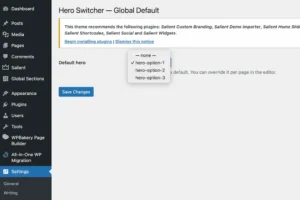
- Global default: Settings → Hero Switcher (or ACF Options if enabled)
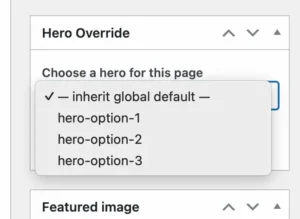
- Per-page override: “Hero Override” meta box on the page
- On the front end, the plugin renders only the selected hero and removes the other variants from output.
Demo setup (what to build in WPBakery)
1) Create three hero rows
In WPBakery, add three separate rows (or sections). Each one should look like a complete hero.
- Hero Variant A
- Hero Variant B
- Hero Variant C
2) Add marker tokens
On each hero row, set one of the following markers as either:
- Row Extra Class Name (recommended)
- Row ID
Example marker tokens:
hero-option-1
hero-option-2
hero-option-3
3) Select which hero displays
Without ACF: choose a global default at:
Settings → Hero Switcher
Per page: override via the “Hero Override” meta box.
QA tools (URL overrides)
Use these parameters to test variants without changing saved settings:
Force a hero
?wphs_hero=hero-option-2
Temporarily shows a specific hero for QA.
Disable switching
?wphs_hero=off
Shows the content unchanged.
Show debug badge
?wphs_debug=1
Displays a small badge with choice/source/allowed markers.
Tip: Combine parameters like this:
?wphs_hero=hero-option-3&wphs_debug=1
Live demo embed
If you have a dedicated demo page/section built in WPBakery, you can embed it here with your own shortcode.
Replace the placeholder below with your real shortcode output.
Hero Variants Used on this page
Global – No ACF
Individual Page Over-ride
Allowed markers
Default allowed markers:
hero-option-1hero-option-2hero-option-3
If ACF Options is enabled, you can add more markers via wphs_extra_markers (comma or line-separated).
FAQ
Will this break my editor layout?
No. The plugin only filters the front-end output (it runs on the_content outside of admin).
Can I keep multiple heroes for comparison?
Yes — all variants remain in WPBakery for editing, but only the selected one renders on the live page.
What if my page has no markers?
Then nothing is removed. The plugin only targets elements that include allowed marker tokens.
Does it work with IDs or classes?
Yes — it matches either id="hero-option-x" or class="hero-option-x".